The post Solve your email delivery problems in WordPress with Spotted Media and WP Mail SMTP appeared first on Spotted Media.
]]>How to set up an SMTP Relay for WordPress forms using WP Mail SMTP, Mailjet, and Avada Forms
If you’re running a WordPress site and using forms to collect enquiries, leads, or orders, reliable email delivery is essential. Unfortunately, WordPress’s default email function (wp_mail()) often falls short – messages may go to spam or not arrive at all.
In this guide, you’ll learn how to set up an SMTP relay using WP Mail SMTP, Mailjet, and Avada Forms to ensure your emails are delivered reliably and securely.
Why Use SMTP for WordPress Emails?
SMTP (Simple Mail Transfer Protocol) is a standard method for sending emails. Unlike the default PHP mail function, SMTP:
- Improves deliverability
- Authenticates the sender
- Reduces spam filtering
- Offers delivery tracking and logs
What You’ll Need
- A WordPress website with the Avada theme and Avada Forms
- The WP Mail SMTP plugin (free version is fine)
- A free or paid Mailjet account
- Access to your domain’s DNS settings (e.g. via GoDaddy, Cloudflare)
Step 1: Install WP Mail SMTP
- In your WordPress dashboard, go to Plugins > Add New.
- Search for WP Mail SMTP and click Install, then Activate.
- Go to WP Mail SMTP > Settings.
- Set your From Email (e.g. noreply@yourdomain.com) and From Name.
- Under Mailer, select Mailjet.
Step 2: Get Your Mailjet SMTP Credentials
- Log in to your Mailjet account.
- Navigate to Account Settings > SMTP & Send API.
- Copy your SMTP server (in-v3.mailjet.com), Port (587 for TLS), and your API key and Secret key (used as username and password in SMTP).
Step 3: Configure DNS for Better Deliverability
To prevent your emails from being marked as spam, you’ll need to authenticate your domain in Mailjet and add DNS records.
- In Mailjet, go to Senders & Domains > Domains.
- Add your sending domain (e.g. yourdomain.com).
- Mailjet will provide DNS records to add – usually:
- SPF: TXT @ v=spf1 include:spf.mailjet.com ~all
- DKIM: TXT mailjet._domainkey with a long string value
- Log in to your DNS provider (GoDaddy, Cloudflare, etc.) and add the TXT records.
- Wait for DNS propagation – this can take a few minutes to several hours.
- Return to Mailjet to verify that the records are correct.
 Tip: If you already use another email provider with SPF, you can combine the include: statements into one SPF record.
Step 4: Complete WP Mail SMTP Configuration
- Back in WordPress, under WP Mail SMTP > Settings:
- SMTP Host: in-v3.mailjet.com
- Port: 587 (TLS) or 465 (SSL)
- Encryption: TLS
- SMTP Username: Your Mailjet API Key
- SMTP Password: Your Mailjet Secret Key
- Save the settings.
- Use the Email Test feature in WP Mail SMTP to check that everything is working correctly.
Step 5: Configure Avada Forms
- In your WordPress dashboard, go to Avada > Forms and create a new form.
- Under the form’s Email tab:
- Set the recipient email address
- Customise the subject line and message
- Save the form and add it to any page or post using the Avada Builder or shortcode.
Because Avada Forms uses WordPress’s wp_mail() function, form submissions will automatically be sent using your Mailjet SMTP relay via WP Mail SMTP.
Step 6: Test the Setup
- Submit a form on your site
- Check that the email is received correctly
- Confirm that email headers show SPF and DKIM have passed
- You can also view delivery logs and stats in your Mailjet dashboard
Pro Tips for Deliverability
- Use a business email address like hello@yourdomain.com rather than a free one
- Set up a DMARC record for additional security (Mailjet provides guidance)
- Monitor bounce and complaint rates in your Mailjet account
- Consider enabling email logging in WP Mail SMTP (Pro version)
Final Thoughts
Using Mailjet with WP Mail SMTP and Avada Forms ensures your WordPress site sends authenticated, trusted emails that are far less likely to end up in spam.
It’s a one-time setup that can save you countless headaches and missed enquiries. If you’re unsure about DNS changes, most providers have detailed help articles – or you can contact their support for help.
Need help setting up your email delivery from your website? Get Spotted. Contact us today.
AI was used to write this post. Post was edited by the author.
The post Solve your email delivery problems in WordPress with Spotted Media and WP Mail SMTP appeared first on Spotted Media.
]]>The post Website design in the 1990s appeared first on Spotted Media.
]]>Cast your mind back to 1997, when the internet was growing up
1997 was a pivotal year for the internet and popular culture. I was living and working in Sweden as an Art Director for Ad agency Ordpolen (The Word Pole). Completely absorbing its fabulous culture and celebrating everything Swedish. From trying to learn the language to making TV commercials in Stockholm. But one aspect of Swedish life fascinated me and that was the growing interest in the World Wide Web or as some people referred to as the Information Superhighway.

k-apple-spotted-media2b
The first website Robert designed and coded

k-apple-spotted-media-bbc-1997b
The BBC's website of the same period - 1997
There were no ipads or smartphones and WiFi had just been launched. The film Titanic became a box office hit, and everyone was going mad for Tamagotchis. South Park premiered, Harry Potter and the Philosopher’s Stone was published and Larry Page and Sergey Brin registered the domain Google.com and the rest is history.
Sir Timothy John Berners-Lee, the inventor of the World Wide Web and HTML markup language was riding high as one of Britain’s leading computer scientists. It was time for me to learn how to design and produce my first website. On my trips back to the UK, I noticed how far behind we were the Scandinavians when it came to website design. Far from being design and marketing led, Britain was at the mercy of the hobbyist computer programmer. Lot’s of spinning animations and ‘look at what I can do’ as a programmer. Nothing wrong with that, it was something we all got caught up in. The emphasis needed to change. Ecommerce would make that happen. Amazon had launched in 1994, and Jeff was busy getting to grips with his office cabling. At the same time I was talking with a colleague about setting up a website for an Estate Agent and we both had Intel 286 PC’s. We were ahead of our time and it wasn’t until 1997 I designed and developed my first website. I reversed engineered the then Sony website – sounds impressive but back then everything was table-based HTML. In fact, with Adobe Photoshop 4.0 you could save image files with HTML and slice them together. Along with Adobe GoLive 4, it was then possible to combine all your elements together. See www.spottedmedia.co.uk/k/index.html A website, showcasing my work at OrdPolen. Don’t forget it was 1997, screen resolutions were much smaller back then and the smartphone hadn’t been invented.
The computer of choice was the Apple Mac
If you were a graphic designer or art director in the 90s, the Apple Mac was the go to platform and with it the Adobe suite of desktop publishing software. No such thing as generative AI back then. Even so, using Photoshop was considered cheating. With its tools, filters and macros, it felt like you could create anything and it would look impressive and impactful. It didn’t and would never replace conceptual thinking. You still needed the original ideas but executing them was a whole lot easier than using a drawing board.
Robert started his graphic design career in a company that had its own hot metal typesetting and hand composition workshop.
It was 1982, when I signed my indentures for a 4 year apprenticeship. The company was uniquely placed to provide a bridge between a printing technology that had existed for hundreds of years (hot metal) and the more modern Offset Photolithography. We were trained in hand composition where type is selected from a type case and set into a composing stick. Each section, once completed would be set into a galley. In contrast to hand composition there was the studio where drawing boards and art boards replaced the composing stick. Photographs were turned into halftones, scanners would capture artwork to turn into negatives. Negatives were used to produce printing plates. Print was where it was at. No internet and TV screens were square but not boring. If you wanted to make a video, you used celluloid and analogue cameras. Scenes were lit with tungsten lights and there was a fight between standards: Betamax or VHS? With the latter coming out on top.
Hand composition/hot metal – a technology that changed the course of history.
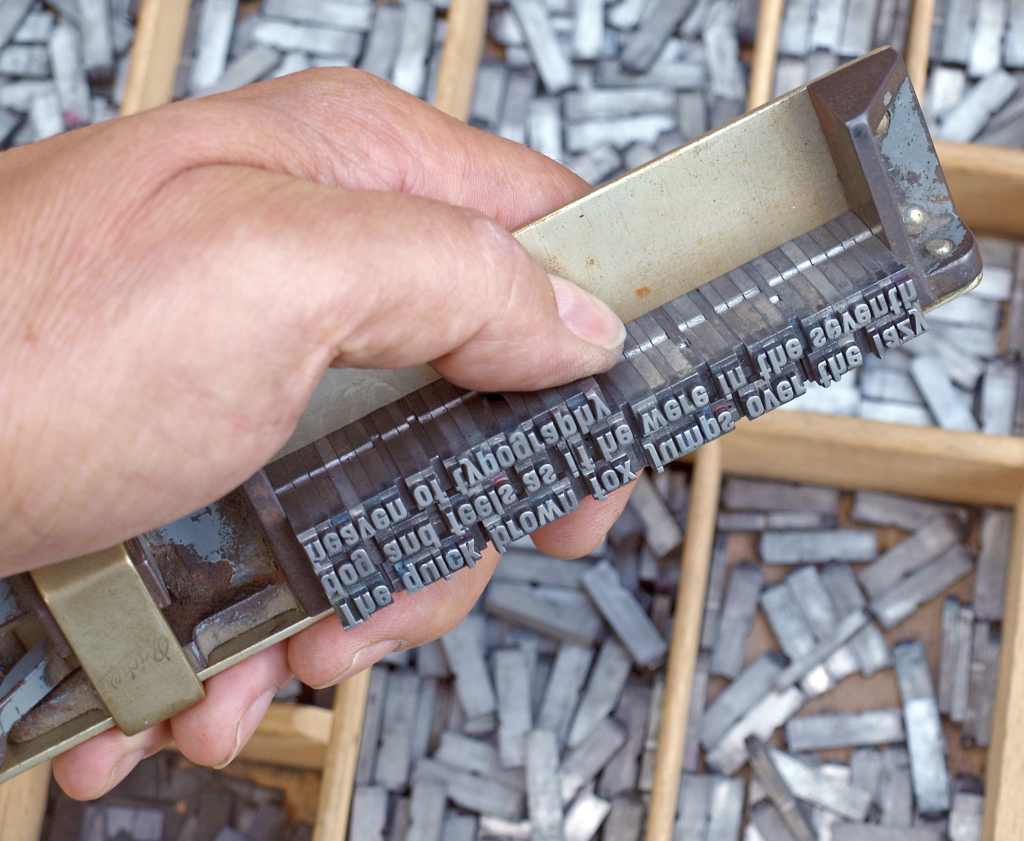
Image courtesy of: Wilhei, CC BY 3.0, via Wikimedia Commons
The post Website design in the 1990s appeared first on Spotted Media.
]]>